

AI Integration Quick Reference
AI Integration Quick Reference
Message class hierarchy:Message categories and types:
- message →
text,image,video,audio,file - custom → Developer-defined types (e.g.,
location,poll) - interactive →
form,card,scheduler,customInteractive - action →
groupMember(joined/left/kicked/banned),message(edited/deleted) - call →
audio,video - agentic →
assistant,tool-result,tool-arguments
message, custom, interactive, action, call) and has a specific type within that category. On the SDK side, all messages extend BaseMessage, with subclasses like TextMessage, MediaMessage, CustomMessage, InteractiveMessage, Action, and Call. Understanding this hierarchy helps you handle different message types correctly.
Message Hierarchy
The below diagram helps you better understand the various message categories and types that a CometChat message can belong to.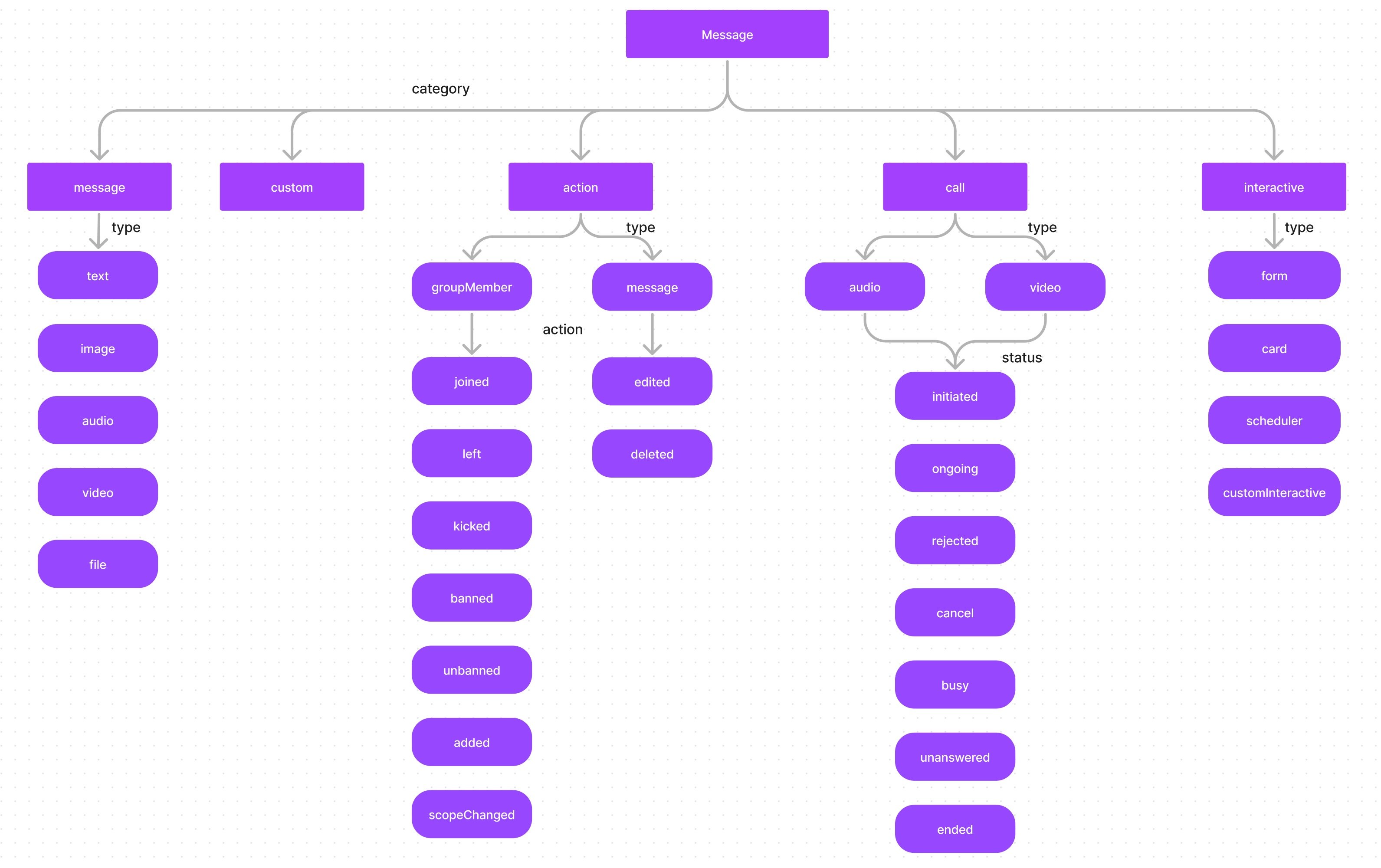
The calling feature is not currently supported by the CometChat Flutter SDK.
Categories Overview
BaseMessage Properties
All message types extendBaseMessage, which provides these common properties:
Message
A message belonging to the categorymessage can be classified into either 1 of the below types:
- text - A plain text message
- image- An image message
- video- A video message
- audio- An audio message
- file- A file message
TextMessage Properties
Inherits all BaseMessage properties.
MediaMessage Properties
Inherits all BaseMessage properties.
Attachment Properties
Custom
In the case of messages that belong to thecustom category, there are no predefined types. Custom messages can be used by developers to send messages that do not fit in the default category and types provided by CometChat. For messages with the category custom, the developers can set their own type to uniquely identify the custom message. A very good example of a custom message would be the sharing of location co-ordinates. In this case, the developer can decide to use the custom message with type set to location.
CustomMessage Properties
Inherits all BaseMessage properties.
Interactive
AnInteractiveMessage is a specialized object that encapsulates an interactive unit within a chat message, such as an embedded form that users can fill out directly within the chat interface. Messages belonging to the interactive category can further be classified into one of the below types:
- form- for interactive form
- card- for interactive card
- scheduler- for scheduler message
- customInteractive- for custom interaction messages
To know about Interactive messages please click here.
InteractiveMessage Properties
Inherits all BaseMessage properties.
Action
Action messages are system-generated messages. Messages belonging to theaction category can further be classified into one of the below types:
- groupMember - action performed on a group member.
- message - action performed on a message.
Action Properties
Inherits all BaseMessage properties.
Action messages hold another property called
action which actually determine the action that has been performed For the type groupMember the action can be either one of the below:
- joined - when a group member joins a group
- left - when a group member leaves a group
- kicked - when a group member is kicked from the group
- banned - when a group member is banned from the group
- unbanned - when a group member is unbanned from the group
- added - when a user is added to the group
- scopeChanged - When the scope of a group member is changed.
message, the action can be either one of the below:
- edited - when a message is edited.
- deleted - when a message is deleted.
Call
Messages with the category call are Calling related messages. These can belong to either one of the 2 types- audio
- video
Call Properties
Inherits all BaseMessage properties.
The call messages have a property called status that helps you figure out the status of the call. The status can be either one of the below values:
Next Steps
Send Messages
Learn how to send text, media, and custom messages
Receive Messages
Handle incoming messages with real-time listeners
Interactive Messages
Create forms, cards, and interactive elements
Edit & Delete Messages
Modify or remove sent messages